





If you enjoy adult visual novels, NSFW games or free porn games on Android, you’ve probably faced the same problem: most of them are not available on the Google Play Store. Google has strict policies against adult content, so the only way to play these games is by downloading the APK and installing it manually.
To do that, you first need to allow apps from unknown sources on Android. In this updated 2026 guide, I’ll show you exactly how to enable it on Samsung, Xiaomi, Motorola, Pixel and other phones — the right and safe way.
Many players from Erovale use this method every day to install the latest free adult games and visual novels. Let’s get started.

Why Do You Need to Allow Apps from Unknown Sources?
Google Play simply doesn’t allow most adult visual novels and NSFW games. That’s why the best free adult games are distributed as APK files on specialized sites like Erovale.
Once you allow installation from unknown sources, you can download and play:
- Adult visual novels (Ren’Py games)
- 3D NSFW games
- Hentai games and dating sims
- Mods and patches for adult games
The process is simple, but it changed after Android 8. Now the permission is given per app (usually to your browser or file manager).
Quick Method: allow apps from unknown sources android
- Open Settings
- Go to Apps (or Apps & notifications)
- Tap Special app access
- Select Install unknown apps
- Choose your browser or file manager and enable Allow from this source
This works on almost every Android phone. Below are the exact paths for the most popular brands.
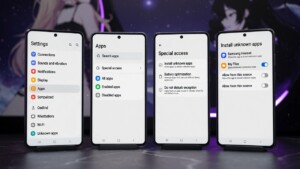
How to Allow Apps from Unknown Sources on Samsung (One UI)
- Open Settings
- Tap Apps
- Tap the three dots (top right) → Special access
- Select Install unknown apps
- Choose Chrome, My Files or Samsung Internet
- Turn on Allow from this source
Recommended for Samsung users: Enable permission for “My Files”. Most people download the APK and open it directly from the Downloads folder.
How to Allow Apps from Unknown Sources on Xiaomi / Redmi / POCO (HyperOS)
- Open Settings
- Tap Privacy protection
- Tap Other permissions
- Select Install unknown apps
- Choose your preferred app (Chrome, Files, Mi Browser…)
- Enable Allow from this source and confirm quickly (you often have only 10 seconds)
Some HyperOS versions hide it under: Settings → Apps → Manage apps → Special app access → Install unknown apps.
How to Allow Apps from Unknown Sources on Motorola
- Open Settings
- Tap Apps & notifications
- Tap Advanced → Special app access
- Select Install unknown apps
- Enable the toggle for your browser or file manager
How to Allow Apps from Unknown Sources on Google Pixel
- Open Settings
- Tap Apps
- Tap Special app access
- Select Install unknown apps
- Enable for Chrome or Files by Google
What If the Option Is Greyed Out?
This is common when:
- Advanced Protection is turned on
- You’re using a work/school phone
- The system is waiting for you to try installing an APK first
Quick fix: Download any APK from a trusted site (like Erovale Android games), try to open it, and Android will force the permission screen to appear.
Is It Safe to Install Adult Games from Unknown Sources?
It can be safe if you do it right.
Many people install adult visual novels and NSFW games every day without problems. The risk comes from downloading APKs from shady random sites.
Best practices we recommend at Erovale:
- Only download adult games from trusted sources (official game pages or curated sites like Erovale).
- Scan the APK on VirusTotal before installing (optional but recommended).
- Prefer games that offer both Windows and Android versions from the same developer.
- After installing the game, you can turn off “Allow from this source” again if you want extra security.
- Keep Google Play Protect enabled.
We only host clean, verified adult visual novels and games. You can download the erovale Android here:
→ Free Adult Games for Android
Frequently Asked Questions
Can I install adult visual novels without allowing unknown sources?
No. Since they are not on the Play Store, you must enable the permission.
Is it better to allow Chrome or the File Manager?
For safety, many experienced users prefer giving permission only to the file manager (My Files / Files by Google). That way the browser stays locked.
Does this work on Android 15 and Android 16?
Yes. The “Install unknown apps” menu is still present in 2026.
Where can I find good free adult games for Android?
You can check the full list of free Android adult visual novels and NSFW games here:
https://erovale.com/platform/android/
Final Thoughts
Learning how to allow apps from unknown sources android is essential if you want to enjoy the best free adult visual novels and porn games available today. Google won’t put them on the Play Store, so sideloading is the only real option.
Just be smart: download only from trusted places, enable the permission only when needed, and enjoy your games safely.
Ready to play?
Browse hundreds of free adult games and visual novels for Android right now on Erovale.